Saturday, June 1, 2013

People are objects with attributes too.

Statements like "...soft skills are an essential and often overlooked aspect of project management..." and "...the importance of getting the right people for your project team cannot be understated..." are the sorts of thing that make me want to swear off the canon of generalist project management literature for good.

Not, you understand, because it's not true. But, because it's self evident and this sort of nonsense makes the job of project management look like the job of professionalising common sense.

I was addressed by a senior member of public sector management some years ago who offered (and I paraphrase here) that "... in the 1990's we hired people for their skills, in the 2000's we hired people for their knowledge and in the 2010's we'll hire people for their behaviour." I hope this worked out okay for those people adopting such an approach.

Quite how you hire someone (or even assess someone in interview objectively) on the basis their behaviour I'm unsure. For all I know, it might not even be lawful.

I do remember thinking at the time that I would continue to hire people on the basis of their talents, track record and ability. I offer it's served me satisfactorily in almost all instances. And, as often as not, supremely well.

Whatever organisational hiring framework you're faced with (challenged by...?), you can adopt and overlay the following approach to determine what you need and help you go and get it.

Someone may offer something supplemental to this appraisal but for the purposes of employment I seek to assess initially what I need someone to know, what I need someone to do and what I need someone to be. Hence the term, "know, do, be framework".

For, let us say, a prospective defect co-ordinator we might define the following know do be framework. I've made the file accessible here if anyone's interested.


So we've taken something somewhat nebulous and intangible, put some structure around it and quantified it. This is I hope well understood to be my general preference for most things. I don't know about you, but I'm already feeling a lot happier about my ability to define and articulate what it is I want.

If you're lucky, you'll be solely responsible for the hiring and you can now formulate some interview questions (or other assessment) via which you can assess a candidates alignment with the know, do, be framework.

Even if you're simply a passive invitee to an interview you can assess a candidate's suitability against your identified criteria and express your preferences accordingly. 

One other point worth noting. You can reverse engineer most job descriptions with this approach. Pick out the key requirements and define some key points in line with what you know, what you are, and what you do that support those requirements. This can be very helpful if you're filling an application form (who still uses those?) but can perhaps more usefully equip you with some very strong responses to likely interview questions.


Saturday, May 25, 2013

Top tip #1 - Milestones, baselines and tracking in MS Project

A bit of a departure from the norm today. No far-reaching debates on the state of the nation - just neat way of creating a baseline and tracking and reporting milestones in MS Project.

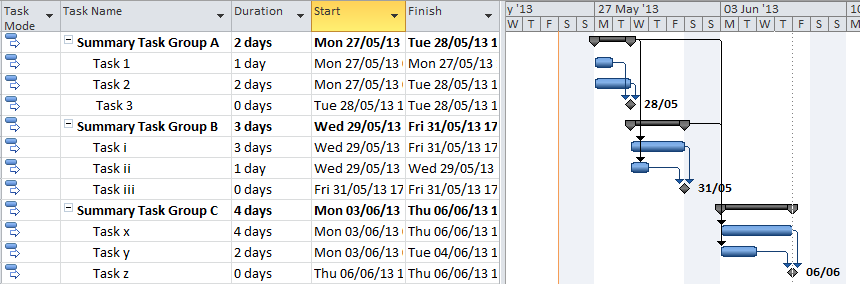
Take the example below (Figure 1). We can save a lengthy discussion about Duration and Work for another time.


Figure 1

You'll see a very brief example project plan with some milestones, tasks and all the usual carry on.

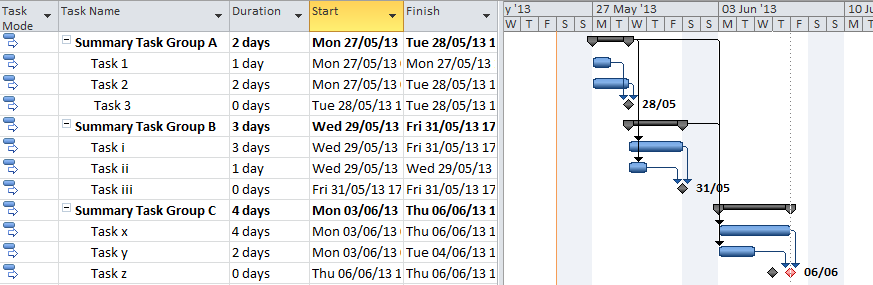
It's not everyday that you get to play spot the difference on this blog but have a look at the illustration below (Figure 2). What's the difference? And, does it matter?


Figure 2

How about Figure 3 then?


Figure 3

Last one then. Have a look at the excerpt below. It's actually the same as Figure 3 - but just formatted a bit differently.


Figure 4
For the eagle eyed amongst you this was all about Tasks x & y and amending the duration. When Task y was adjusted in Figure 2 - the milestone Task z didn't get pushed out. But when Task x was extended in Figure 3 - it forced the milestone Task z to get pushed out a day.

This is hard enough to spot and track on this simple example. At the 50 to 100 row level its next to impossible (yes - I know Project helps with highlighting tasks which change but that's not a panacea for us here. Particularly when plans are being shared and updated by multiple parties).

What is shown in Figure 4 however is a tiny bit of formatting on a baselined project plan and it is immediately apparent that the milestone has moved. I think this is very very helpful. It helps you (the project planner or project manager) while tinkering with your project plan to see what you have manipulated and which milestones move and by how much. It's also extremely helpful in tracking a milestone summary derived from several plans - but we'll come to that another day.

For now a quick explanation on how this is done.


  1. Baseline your project plan. In Microsoft Project 2010, select Set Baseline from the Project group on the ribbon.
  2. Select (say) Baseline1 from the drop down (you can use the default)
  3. Click OK
  4. Select Format | Bar styles from the Format group on the ribbon
  5. In the name column, find Milestone and change the colour to Red (for instance)
  6. Select Insert Row, enter Baseline1 in the name column, format your the appearance as a black milestone, enter Milestone in the Show for tasks column and select "Baseline1 finish" for both the From and To fields.
The output should end up looking like Figure 5 below. Click Okay to apply the changes.


Adjust your project plan to push out a milestone and you will see both the original baseline milestone and the new milestone date.

Very handy.

Sunday, May 12, 2013

WBS - Second Foundation

A previous post (WBS as foundation) is far and away the most read post on my blog. So (and with a passing reference to Mr. Azimov) I'm following up with some additional practical tips that I use on more or less a daily basis.

For what a WBS is, how to construct one, what its ideally applied to and its limitations see my previous post.

So we still use the hierarchical structure previously described and I tend to use the SmartArt feature in Excel to generate and maintain the WBS structures. I tend to keep things fairly segmented - one worksheet per WBS and one WBS per work stream.

Please, please note - there are some big powerful tools out there for generating and maintaining WBSs. SmartArt works for me because as often as not I'm in a position to decompose stuff to a level that suits me. It may not work for you.

What I do next is create a product dictionary on a separate worksheet. I'll include a sample spreadsheet in a little while so you'll see the whole shooting match in action. There's a reason we put all the products on one sheet and you'll see that in the template I supply.

I cite a few points worth consideration.

  1. In my last post I talked about the constant K - and idealised abstraction of the total amount of work required to deliver your project assuming no waste. This is relevant to our discussion here as K1 is the volume of work not identified during planning and due diligence. If you can't include it at the outset of a project, include the work as you discover it within the WBS and product dictionary - there's all sort of good reasons why.
  2. The product dictionary is a fantastic way of tracking all your discrete components of work, who's doing it, the status of the work and a host of other stuff to
  3. The work breakdown structure and the product dictionary comprise a very good record of the work done, work in progress and work yet to be started.
  4. The product dictionary forces a degree of rigour into the definition of work that is issued to members of the project team
  5. If you do define the WBS and product descriptions up front, the project plan will pretty much write itself. I succeed in winning this argument about 50% of the time and that 50% is always a better oiled and tuned project than the other 50%.
  6. Both the WBS and product descriptions can form a very useful foundation to reporting and communication (what's done, what remains to be done and so on).
So there's a lot to recommend these two products and we can still extract a bit more smartness from the approach. See my work book here. I've included two different WBSs, each of which applies to a different work stream. We've got a product dictionary with a number of products assigned to three different people. There's a bit of filtering applied which means we can (for instance) pull all the products assigned to a given individual. And there's a bit of conditional formatting which means the individual line items change colour depending on their status which makes keeping an eye on things that little bit easier.

You could configure conditional formatting to change the colour (say) for items that are 7 days before their due date or for items that are due or overdue. But, that's really something I tend to rely on my project plan for.

You'll notice a lot of duplication in the sheet. In the instance here this is because this is a specimen created solely for you delectation and delight. However, it does highlight a particularly useful element of working in this fashion which is within any product dictionary there is a great deal of duplication. The Quality Criteria are generally re-usable for various products as are the resources and acceptance method. In short, these build nice and quickly, particularly where there's a bit of existing policy, process and procedure which can be referenced.

Lastly - something useful in Excel is the paste special 'transpose' function which means I can take any row, paste special and transpose into the 'product description' sheet as shown and I've a readily communicable summary of the product description to do with as I wish. If the product description looked familiar - it's a standard Prince 2 product.

And that is really about all there is to it.

Sunday, April 14, 2013

Late for a very important date - again?

Say what you will, most projects don't get delivered on time. A critical appraisal might include the word late. I'm starting to think however that the terms 'on time' and 'late' are worth consideration. And maybe, if enough consideration is given to the subject perhaps there might be something genuinely novel and interesting to conclude about the nature of projects generally, the frailty of current management approaches and what can be done about it.

There's an interesting blog post here that I read sometime ago - you should read it but in absolute summary - there's no such thing as slipping dates, just bad forecasts. I remember this really making an impression with me when I read it. I don't just think its a good point, I think its a potent entry point to a much richer discussion.

A while back I prattled on about an idealised constant 'K', which represented all the work that was required to be done to complete your project assuming no waste. I've re-rendered the drawing below.


There's some simplification here. There's no discussion of change requests, procedural acumen or PMO statistics for this sort of project run in your organisation but broadly;

Work that needs to be done to complete your project is K
Work that you identify to be undertaken for your project is Kb
Magnitude of error in plans is K - (k2) + (k1).

k2 is interesting as you may or may not end up doing it and to some extent it cancels out k1 which you'll always have to do.

What's our list of variables then? Things that might influence k1 & k2. I suggest the following
  1. Preliminary planning fails to identify accurate the work that needs to be undertaken or the time it will take to complete it.
  2. Failure to accurately identify dependency relationships, leads and lags
  3. Blunders, poor forecasting and re-work
  4. A change budget (£/$) but no corresponding schedule allowance
  5. HR Management issues (absence, incompetence and ineptitude)
  6. Failure to manage complexity
  7. Criminal or unlawful activity
  8. Acts of nature
Of the 8 points above, I would suggest that item 1 is far and away the most significant. Some other time I might take the time to blog on the predilection of homo sapiens to focus on outliers at the same time as dismissing the significant but for the time-being I think I'll simply focus on items 1, 2 & 3 above.

Let's take a moment to summarise and take stock. Project delivery consistently moves to the right (perhaps systematically so) and there is (I suggest) some consistent harbingers of this movement. Interesting this isn't it? We've got a consistent output (delays and destabilisation of the project schedule), consistent inputs (I'll continue to subscribe to points 1-3 above - other views almost certainly exist). Shouldn't this mean we can do something to quantify and assess the potential impact to our projects?

There's a little bit of overlap here potentially with the schedule performance index which I mention here. But its not quite the same animal. Firstly, you've actually got to implement some rudimentary earned value management and (somewhat shockingly) almost no one ever does. But it will only help you so much as it will only use a sample of work done so far rather than a more useful measure the project in its entirety. This means you'll get increasingly good data as your project progresses but at the outset, it'll be highly unreliable.

At this point, I feel I want to talk about cooking for a while. 

Cookbooks are full of recipes. They describe the ingredients and implements required, the steps, temperatures and techniques to use and usually describe the output. They do this consistently well otherwise people wouldn't buy them.

If you follow the instructions and you have a little culinary acumen you can have a high level of confidence that what is delivered will be edible. Delicious even. If however, you use second rate ingredients, rush the prep, burn the food and respond to a late request to remove the anchovies, there's significantly less chance that what you deliver will be fit for purpose or on time.

Cookbooks are a good illustration of our idealised constant 'K' that I mentioned above. They do have the advantage however that a) they're not a unique undertaking and b) almost universally they'll have been reworked and rehearsed perhaps over several generations. So, they're not projects are they. But they do highlight the importance of knowing everything there is to know at the outset and what the benefits of knowing everything are.

Continuing on our epicurean line for a spell longer. If we removed some of the ingredients and steps from a recipe we'd be doing something to model in abstract the deficiencies in planning to which many projects (all?) find themselves prone. Would we be able to identify the omissions? What could we do with them if we did identify them?

We'll, there's one sure way of identifying that there are omissions (as opposed to what they are) and that's cook the dish. I don't think its too much of a stretch to suggest that any omissions could be identified and quantified. So what's the benefit of investing this time and effort? What can we do with the information we're now in possession of?

Can we extrapolate anything about the remainder of recipes in the cookbook (project)? Can we play any discrepancies across the remainder of the project? Well, maybe. Omissions from the fish section might not be applicable to the dessert section and should you take your cookbook to your aunt's for Sunday roast, all bets might be off when comparisons are made with cooking in your own kitchen. This is where the schedule performance index (and cost performance index) fall short for our purpose here - they focus exclusively on the sample of work that has been done, not a proportionate sample of the whole piece.

What I am tilting at here is that if we cook a few recipes up front we'll be better able to assess the cookbook in its entirety. The more recipes we test (the greater the sampling) the better picture we'll develop of the overall scheduling, scope and procedural quality.

So what next? I'll seek to elaborate the points above and answer the following questions.


  1. When is this sort of critical appraisal essential as opposed to desirable or superfluous?
  2. What could the job of analysis of a project scope / schedule entail?
  3. What could the output be used for?
  4. Who would do it? When? And for what purpose?


Sunday, March 3, 2013

Forecasting - part four

Ironically in my first post on forecasting I cited the following points which I would aim to cover.
  1. Parametric or reference class forecasting
  2. Guessing, uncertainty and pragmatism
  3. Never mind 6 Sigma - 1 will do you quite nicely
  4. The PM's job in fighting for exactitude and rigour in the planning process
  5. Some helpful language and strategies to challenge sub-standard practice
  6. Some real life scenarios and tools consistent with other articles in this blog that I hope will add a bit of value
And here we are on the fourth post on the topic and I think I still have pretty much the lot still to get through. Something relevant to the topic of forecasting in their somewhere methinks.

Let's hustle on a bit. 

Parametric or reference case forecasting is simply the process of using historical events to inform forecasting. Let's go back to our example of changing a car tyre. I discussed some useful stratagems on getting to a more accurate forecast, but ultimately you can't beat having changed a tyre yesterday to inform a useful forecast on how long it might take today.

Guessing? Don't do it. If you don't know how long something is going to take, set a duration on your project plan and commit to using a schedule performance index to track progress and assign more (or less resources as appropriate). Or, some other similarly pragmatic approach.

Standard deviation isn't something we've talked about before and I think it would be worth keeping this back for a specific post. (That's the point on 6 Sigma / 1 Sigma above). What I think I will do for the remainder of this post is focus on point 5 above.

There are undoubtedly a great many opportunities for the activity of forecasting to fail. I'm going to describe a few ways that (I've seen) project delivery deviate wildly from the forecast and then highlight some stratagems to help avoid it doing so.

Shoddy project planning - I don't know how many more project plans I'm going to have to work with that comprise 1000+ lines, rely wholly on duration based (rather than effort based) planning and (to top it all) incorporate 50%+ of hard coded dates.

I don't have the knowledge, capacity or inclination to write at any length on the topic of project planning and good practice using MS Project (or other). However, allow me to suggest that the inputs to creating a project plan include the following;
  • Experienced planners who understand critical path analysis, activity on node / on arrow techniques
  • Knowledgeable staff who have either been through a structured programme of learning or other activity necessary to equip them with the knowledge needed
And some general useful pointers while we're on the topic

  1. The near term should be at a far greater level of detail than than the mid- or long term
  2. Decompose tasks to an 'appropriate' level of detail
  3. You don't have to, but project plans comprising tasks which track back to product break down structures and product descriptions tend to have a much firmer foundation
  4. Supplement your forecasting with appropriate controls so that if you're wandering off schedule, your have good information early
  5. Make sure public holidays and staff leave are configured within your resource planning
  6. Agree up front what the resource capacity is (70%-90% - typically 80%). Never 100%.
  7. Practice rigorous change control. You may (or may not) be able absorb additional tasks of less than 0.25 days effort. Make sure you have a mechanism to manage anything that exceeds what you can comfortably accommodate.
  8. Building (clandestine) budget contingency into business cases and budget forecasts is wrong (and can be fraudulent). However, I'm pragmatically fairly well disposed to building in a degree of flexibility / contingency into forecast schedules. You'll be able to cope with a greater degree of unforeseen events and I've yet to find a client who complains when you bring something in a bit early. You'll also be able to give the client an answer other than no when he asks if you can bring something in a bit quicker.
Supplier management issues certainly figure highly in my short list of frustrations most likely to unhinge a project plan. You're embarked upon a project and chances are, so is your supplier with all the vicissitudes to which projects in general or prone. Some points intended to enhance stability follow.

  1. Don't blur the lines between dependencies. If you have a dependency for which the supplier is responsible, don't start to re-plan and re-forecast (unless absolutely necessary) when the supplier starts to slip. That's a recipe from a problem shared is a problem doubled.
  2. Make sure your contract and commercials with the supplier are appropriate
  3. Make sure you have the appropriate written and agreed documentation to support the supplier's statement of work and scope of supply. 
  4. Verify your supplier has instated 'good practice'.
Governance or lack thereof. Get the right decision made, at the right time to the right criteria. Incidentally, it's worth mentioning IT Governance in here - this is distinct to the typical corporate and project governance insofar as it's principal objectives are maximising value and minimising risk. Technical design assurance, testing, change management and a solid approach to service transition all comprise elements of good IT governance.

A little more yet to cover on this topic generally. If I'm feeling suitably whimsical, I may relay at some future point my thoughts on the role of analogue computing to forecasting in project management (another first for PMfizz surely?)


Saturday, February 9, 2013

Equine allegories

First, please excuse the title  - a cunning attempt at promoting my blog. Anyone (and I mean anyone) who Googles "Equine allegories" is sure to be directed straight here. A winning strategy I think you'll agree.

Now, for those of you not in 'my manor' as it were, there's been a bit of a scandal of late with beef not being beef. Suffice it to say, jokes about Red Rum Steak abound. 

I think this has got some fascinating insights for anyone in the business of change.

Let's talk about quality assurance and product acceptance first. Projects are comfortable in a landscape of customer / supplier. Other approaches exist. I've always adopted a stance that the supplier is accountable for quality assurance. Equally, the customer never divests themselves of the onus for due diligence corresponding to product acceptance. It is too risky to rely wholly upon the supplier's quality assurance.

Now, risk. I've never been comfortable about the whole 'transferral' of risk thing. Mainly, because I don't think you can transfer risk predictably and reliably. I'm minded of a supplier who was responsible for building the new Wembley Stadium and F.A cup finals which were held in Cardiff (Wales) for 2 (3?) years due to delays in construction. And similarly here, while the supermarkets in Britain can point the finger at their suppliers, the fact they've not done their own testing isn't going to sit well with their customers. Particularly when they've almost certainly profited from the whole fiasco..

From a consumer point of view, it seems to me that the consumer demands choice at the lowest  price. Now hold on a minute there, because actually, I don't.. But, it's the line spouted by the business's involved in grocery retail so there may be a grain of truth in it. So, if we only make a purchasing decision predicated upon cost, then we're likely to get a supplying decision predicated wholly around cost with all the consequences it brings.

You'd think governance would play the part of fair, honest and effective broker in all this. I wouldn't. Basel II, Sarbanes Oxley and FSA couldn't avert the biggest banking crisis of a generation. You can try all the tricks in the book to minimise risk, maximise value and ensure the right decisions are made by the right people to the right criteria at the right time. But, if greed, gain and guile are the prevailing cultural themes within an organisation, it won't matter.

But, there is an up. Discovering that stuff has gone wrong today makes you better off than you were yesterday. You can start the job of corrective action, you can learn some lessons and strengthen whatever is needed to prevent re-occurrence. 

Finally, there's something else to take away from all of this. We can read and write all the books we like. Develop the discipline of project management in new and exciting directions. Effective and sound judgement however is something ephemeral, acquired slowly and lost quickly. 


Saturday, February 2, 2013

Requirements part 5 - a very useful spreadsheet

I think there might actually have been one or two more posts on requirements than 5. No matter the end of the tunnel is in sight.

I've written quite a bit about what not to do with requirements and conversely some useful salves for common problems. What I haven't done (until today) is state clearly my approach to managing requirements (and more besides) or provide the tool to get the job done.

To date, we've talked about MoSCoW analysis (yuk!), pair-wise comparison, cost of compliance / non-compliance, KANO analysis and quite a bit more besides. We've never talked about UML or a bunch of other stuff, but ultimately (as you'll see) that might not matter too much.

Consider the illustration below - a veritable soup of inputs relating to requirements. Equally, a customisable and completely transparent score card that can be constructed and agreed by stakeholders early in the process.

What we're starting to get towards here is an approach to requirements prioritisation and management that can be highly customised to suit any situation. 

Get the stakeholder buy-in right, get the score card right and the rest will follow.

In the example below, I've used the following scoring elements - you however can use what you like.


  • MoSCow - exactly what it says on the tin. MoSCow does have its place albeit do remain cognisant of the limitations previously discussed.
  • Kano - see last post. A quick and easy way of assessing non-monetary value
  • Contribution to the business plan - if it doesn't contribute, should you be doing it?
  • Compliance - do we have to have this to meet regulatory requirements?
  • Senior stakeholder flag - if the the budget holder wants it in taupe, then let's have that right out in the open from the get go.


Your score card might incorporate the elements illustrated above or be something complete different. You might have specific organisational imperatives which mean you incorporate none of the elements above - fine. The approach is no less valid.

So - you've got a score card - what next? Excel that's what. What you're seeing below is the scorecard above incorporated into Excel.


It's not too busy a spreadsheet but it has got a couple of tricks up its sleeve.

First, the fields are 'constrained' and aligned with the scorecard.


And, we've got a a simple but long formula to do the scoring calculation. Note the red highlight. We don't put the scoring in the formula itself - we use a lookup to a table elsewhere. This is important and we'll discuss this more later.

=IF(C2="Must have",Lookups!$B$1,(IF(C2="Should have",Lookups!$B$2,(IF(C2="Could have",Lookups!$B$3,(IF(C2="Won't have",Lookups!$B$4)))))))+IF(D2="Dis-satisfier",Lookups!$D$1,(IF(D2="Satisfier",Lookups!$D$2,(IF(D2="Delighter",Lookups!$D$3)))))+IF(E2="Key",Lookups!$F$1,(IF(E2="Required",Lookups!$F$2,(IF(E2="Aligned",Lookups!$F$3)))))+IF(F2="Yes",Lookups!$H$1,(IF(F2="No",Lookups!$H$2)))+(IF(G2="Yes",Lookups!$J$1,(IF(G2="No",Lookups!$J$2))))

I've uploaded the spread sheet here and you can play to your heart's content.

Some things to bear in mind.


  1. You aren't constrained to 'sum' the scores. Multiplication has its place particularly as it opens up using a zero to effective nullify a requirement
  2. You aren't constrained to using this just for requirements - the same approach works very well for (say) assigning a risk rating to server moves in a data centre migration
  3. I've used significantly larger spreads sheets both in terms of the number of criteria used and the scores which correspond to those criteria. Undoubtedly there's a limit but I haven't found it. If you do (and good luck with that) you can always split the formula in two and sum the output.
  4. Don't limit yourself to linear scoring - in point of fact, you're going to need to justify very carefully the use of linear scoring (i.e 1,2,3,4,5,6 as opposed to 1,3,8,20). Most things (I think) will benefit from a non-linear scoring approach.
  5. Make sure you get your criteria right from the get go, the scoring only needs to be 'about' right as we re-tune that later on.
  6. Weighting - don't think you can't apply a specific weighting to one or more elements on the scorecard - in point of fact this is just another way of playing with the scoring but don't rule it out.
  7. If you're smart enough you can probably use a custom list in SharePoint to do this.
Finally, getting the scoring in the scorecard right from the get go is tough. So tough in fact that I discourage you from trying. Stakeholders can get a bit cagey too as, while they see the merit in the approach, they tend to be less certain about getting tied down by a scorecard that they (quite understandably) can't appreciate the fullest implications of at the outset.

Fine tuning the scoring is the subject of the next post.